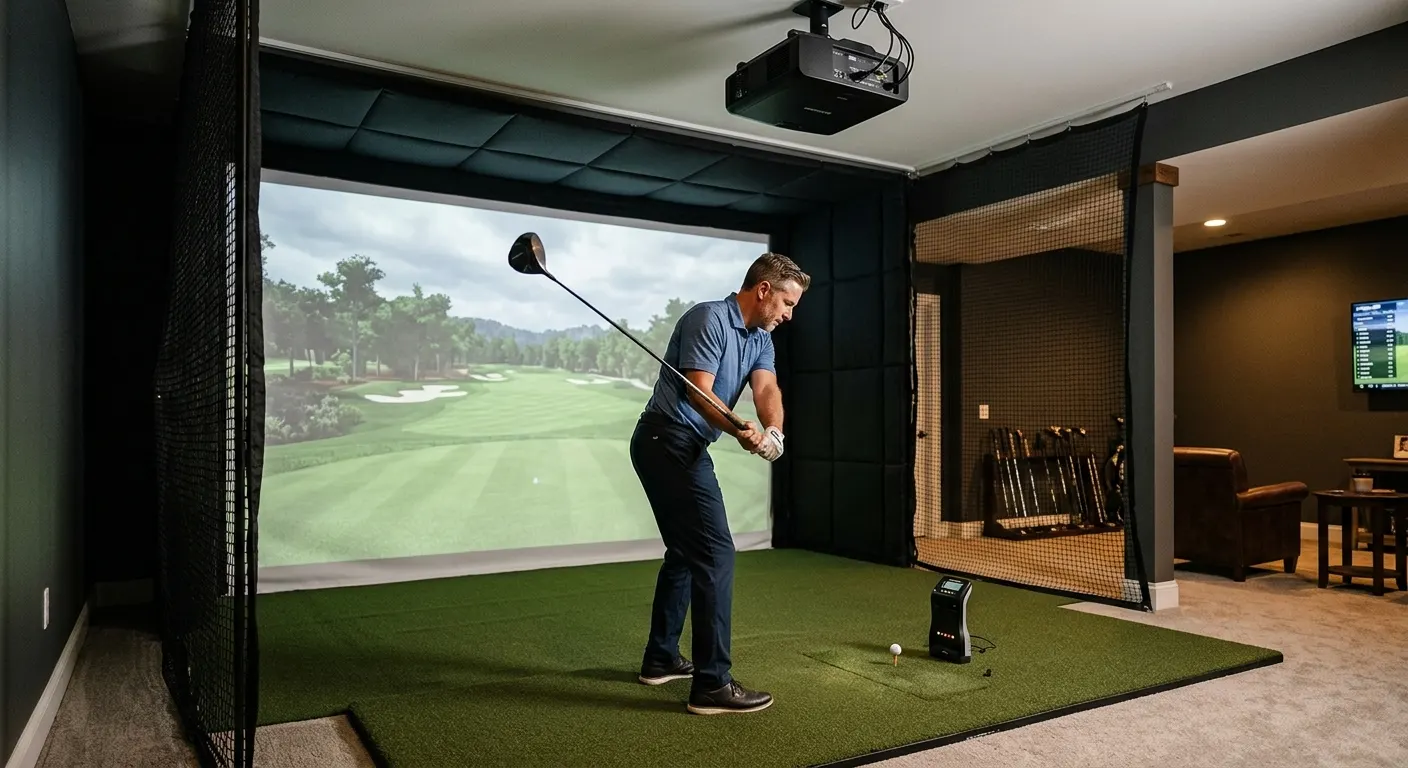
How to Build a Home Golf Simulator: 2026 Guide
By Divotloft . 14 min read . Updated June 2026
Building a home golf simulator breaks down into five decisions made in the right order: launch monitor, hitting mat, enclosure and impact screen, projector, and simulator software. Get the order wrong, and you end up with a launch monitor your software does not support or a projector that cannot fill your screen from your room depth. This guide walks you through each decision in sequence, linking to the best current options at each price point so you can build a complete, functional sim room without expensive rework. Start with the launch monitor, because it drives every other choice. The Rapsodo MLM2PRO Mobile Launch Monitor is where most first-time builders land in 2026: directly measured spin, 15-ball and club metrics, and no mandatory subscription under $700. From there, work outward to the surface, the screen, the image, and the software.
Quick answer
Start with the launch monitor because it determines software compatibility. Then choose a hitting mat, a complete enclosure with impact screen, a short throw projector sized to your room, and simulator software. The Rapsodo MLM2PRO anchors most 2026 builds at under $700, pairing well with GSPro and a SIG10 enclosure. Budget $4,000 to $8,000 for a complete functional build.
This guide contains affiliate links. Divotloft may earn a commission at no cost to you.
Step 1: Choose your launch monitor first
The launch monitor is the brain of the build. It feeds ball speed, launch angle, spin rate, carry distance, and club data to your simulator software on every swing. Your software choice must support your launch monitor, so picking the monitor first avoids a compatibility dead end later.
For most 2026 first-time builds, the Rapsodo MLM2PRO Mobile Launch Monitor is the clear starting point. Its dual camera and Doppler radar hybrid delivers directly measured spin without metallic dot stickers, captures 15 metrics including club path and face angle, and connects to a phone or tablet via the Rapsodo app. Basic simulation is free; a premium membership unlocks full course play.
If you want zero subscription cost at all, the Garmin Approach R10 Launch Monitor pairs with E6 Connect and GSPro at around $500 with no mandatory plan. It estimates rather than directly measures spin indoors, but the accuracy is adequate for recreational simulation. Battery life runs to ten hours, making it genuinely portable for range trips between sessions.
Moving up the budget, the FlightScope Mevo Plus Launch Monitor at $1,999 to $2,199 uses Fusion Tracking combining radar and image processing and includes 12 E6 Connect courses with purchase. The SkyTrak ST MAX Launch Monitor at $1,695 to $1,995 adds dual Doppler radar, dual USB-C for play-while-charging, and GOLFTEC speed training integration, at a lower price than the Mevo Plus. Both require a software subscription on top of the hardware cost. At the professional end, the Bushnell Launch Pro Launch Monitor applies Foresight GC3 photometric technology in a consumer package with club face data including loft, lie, and face angle.

Rapsodo MLM2PRO Mobile Launch Monitor
A dual camera and Doppler radar hybrid that delivers directly measured spin, club path, and face angle data at under $700, the most complete affordable launch monitor for home simulator use in 2026.

Garmin Approach R10 Launch Monitor
A pocket-sized radar launch monitor priced around $500 with zero mandatory subscription and compatibility with E6 Connect, GSPro, and over 42,000 Home Tee Hero virtual courses via the Garmin Golf app.

SkyTrak ST MAX Launch Monitor
SkyTrak's current flagship photometric launch monitor with dual Doppler radar, dual USB-C ports for simultaneous charging and play, and integrated speed training powered by GOLFTEC, priced at $1,695 to $1,995.

FlightScope Mevo Plus Launch Monitor
A patented Fusion Tracking unit combining 3D Doppler radar and image processing that delivers over 20 ball and club metrics indoors and outdoors, currently priced at $2,199 in its final sales phase.

Bushnell Launch Pro Launch Monitor
A photometric launch monitor using Foresight Sports GC3 technology in a Bushnell-branded package, delivering club face data, spin, and ball flight metrics at a price point between consumer and professional units.
Step 2: Pick a hitting mat that protects your joints
The hitting mat is the surface you swing from every single session. A cheap hard rubber mat stops the club abruptly on any fat shot, sending impact shock into your wrist and elbow. Over a season of heavy use, that adds up. A quality mat either uses dense fiber that absorbs the club or a gel system that compresses like real turf.
The Real Feel Country Club Elite Golf Mat from Real Feel Golf Mats is the default mid-range choice: 110-ounce dense nylon turf on a closed-cell foam base, available from 4 x 5 feet up to 5 x 10 feet. It accepts standard wooden tees for driver practice and pairs well with photometric launch monitors that read the ball lie at impact. Prices run $249 to $499 depending on size.
Golfers who want the most realistic turf feel should look at the TrueStrike Single Golf Hitting Mat , which uses a patented gel-filled divot section that compresses and moves like actual ground interaction on every iron shot. For a permanent studio build where you want the hitting surface and stance area in one wide footprint, the Fiberbuilt Grass Series Studio Mat Center 9x4 at $1,499 creates a 9-foot-wide setup with a center hitting position and replaceable inserts rated for 300,000-plus swings. The compact Fiberbuilt Grass Series Practice Station at $499 uses the same fiber technology for those who want Fiberbuilt quality before committing to a full studio mat.

Real Feel Country Club Elite Golf Mat
A 110-ounce dense nylon mat on a 5/8-inch closed-cell foam base that accepts real wooden tees, cushions joints on fat shots, and pairs well with photometric launch monitors that read the lie at impact.

TrueStrike Single Golf Hitting Mat
A UK-designed hitting mat with a patented gel-filled divot section under the hitting surface that compresses and moves like real turf on impact, delivering the most realistic ground-interaction feel of any portable mat.
Fiberbuilt Grass Series Studio Mat Center 9x4
A 9-foot by 4-foot studio mat with a center hitting position that creates a wide stance area on both sides, Fiberbuilt's standard recommendation for a complete home simulator floor setup, priced at $1,499.
Fiberbuilt Grass Series Practice Station
A compact, portable Fiberbuilt entry point using the same patented fiber technology as the studio mats, priced at $499, good for golfers who want the Fiberbuilt feel without committing to a full studio setup.
Step 3: Set up your enclosure and impact screen
The enclosure contains your shots and projects the course image. An impact screen must handle repeated ball strikes at speeds up to 150 mph or more while staying flat and tight enough for a clean projected image. Most first-time builders choose a complete kit over a custom build because everything arrives sized for each other.
The The Indoor Golf Shop SIG10 Enclosure from The Indoor Golf Shop is the most recommended complete kit for home builds in 2026. It arrives as one box with a tool-free aluminum frame, SIGPRO impact screen rated for ball speeds up to 250 mph, side barrier netting, and weighted anchors. Assembly takes one to two hours for one person. The 11-foot width fits most two-car garages; for smaller rooms, the The Indoor Golf Shop SIG8 Enclosure delivers the same SIGPRO screen quality in an 8-foot-wide package that fits one-car garages.
DIY builders who have their own frame should look at the Carl's Place Premium Golf Impact Screen , which is available in custom sizes to the inch on a tight-woven polyester surface rated for high-speed impacts. Add Golf Simulator Side Barrier Safety Netting panels to any custom build that does not have integrated side containment. Side barriers catch wide pulls and pushes that miss the screen before they hit walls or equipment.
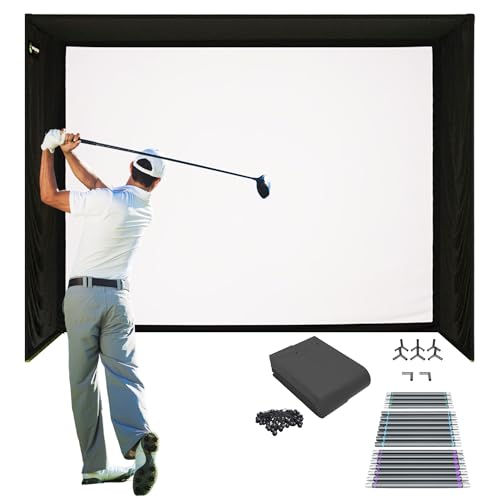
The Indoor Golf Shop SIG10 Enclosure
A complete tool-free enclosure kit in a single box with an 11-foot-wide aluminum frame, SIGPRO impact screen, side barrier netting, and weighted anchors, consistently ranked the best all-in-one enclosure for home builds in 2026.
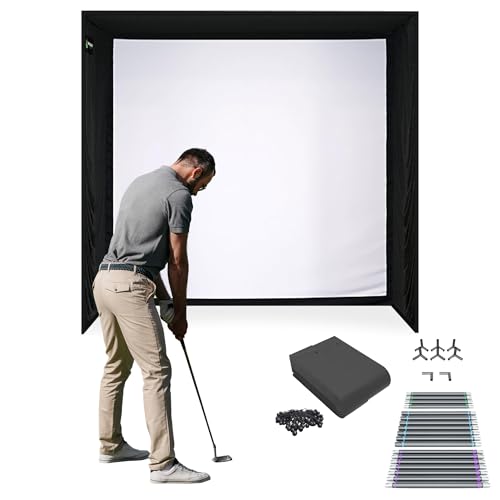
The Indoor Golf Shop SIG8 Enclosure
The 8-foot-wide sibling to the SIG10, offering the same SIGPRO screen and tool-free frame in a compact package that fits one-car garages and smaller basement rooms.

Carl's Place Premium Golf Impact Screen
A custom-spec woven polyester impact screen available in sizes down to the inch, designed to hang in an existing frame or custom enclosure build, with a bright projection surface and rated for repeated high-speed ball impacts.

Golf Simulator Side Barrier Safety Netting
Standalone side barrier panels that mount beside an impact screen or enclosure to catch wide pulls and pushes that miss the main screen surface, an important safety addition for any custom enclosure build.
Step 4: Choose a short throw projector for your room depth
Golf simulator projectors must mount above and behind the golfer to eliminate swing shadows, which means a short throw ratio is essential. Divide your throw distance by your screen width to find the ratio you need. For a 10-foot screen with the projector 8 feet from the screen, you need a 0.8:1 throw ratio or tighter.
The BenQ TK710STi Golf Simulator Projector is the best value 4K laser pick for most builds, with a 0.69 to 0.83 throw ratio and Golf Mode color calibration at roughly $1,799 to $2,199. IP5X sealed optics resist garage dust and vibration, and the laser engine avoids bulb replacements for the life of the sim room. For the most refined image and motorized Auto Screen Fit, the BenQ AK700ST Golf Simulator Projector at $2,699 to $2,999 is the flagship golf-specific projector.
For very tight rooms where the projector must sit under 6 feet from the screen, the Optoma GT2400HDR Short Throw Laser Projector delivers a 0.496:1 throw ratio and 4,200 lumens in a new-for-2026 laser package at $1,299. The proven Optoma GT2100HDR Short Throw Projector covers the same throw ratio for under $1,200 but at 1080p resolution. Mount any of these with an AllSportSystems SkyRail Sliding Projector Ceiling Mount that allows fore-and-aft position adjustment on a 48-inch rail without re-drilling the ceiling.

BenQ TK710STi Golf Simulator Projector
A true 4K laser short throw projector with a 0.69 to 0.83 throw ratio, Golf Mode color calibration, and IP5X sealed optics rated for dusty garage environments, priced roughly $700 to $900 below the flagship AK700ST.

BenQ AK700ST Golf Simulator Projector
BenQ's flagship golf-dedicated projector with motorized Auto Screen Fit, Golf Mode color calibration, 4K laser, and IP5X sealed optics, the most capable purpose-built golf simulator projector available under $3,000.
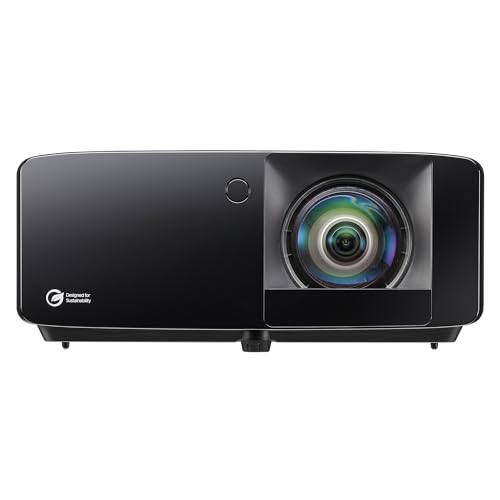
Optoma GT2400HDR Short Throw Laser Projector
A new-for-2026 ultra short throw laser projector with a 0.496:1 throw ratio that can fill a 12-foot screen from under 6 feet, 4,200 lumens, and a 30,000-hour laser lifespan, priced at $1,299.

Optoma GT2100HDR Short Throw Projector
A proven ultra short throw 1080p projector with a 0.496:1 throw ratio priced under $1,200, the go-to budget option for tight simulator rooms where the projector must sit close to the screen.

AllSportSystems SkyRail Sliding Projector Ceiling Mount
A sliding ceiling-mounted projector arm with a 48-inch rail that lets you shift the projector fore and aft to dial in screen fill for both 4:3 and 16:9 formats without unscrewing the mount from the ceiling.
Step 5: Pick your simulator software
Simulator software turns your launch monitor data into a playable round on a virtual course. The platform you choose determines course library, multiplayer options, and total annual cost. Confirm your launch monitor is on the software's official compatibility list before purchasing.
GSPro Annual Subscription is the community standard in 2026: flat $250 per year, 1,000-plus community courses, 4K Unity-engine graphics, and online multiplayer with broad launch monitor support. E6 Connect Golf Simulator Software at $300 to $600 per year has been around longer, supports the widest range of launch monitors officially, and bundles free with several hardware units including the Mevo Plus. If you hate subscriptions entirely, The Golf Club 2019 Simulator Software charges roughly $1,000 once for permanent access to 170,000-plus player-created courses, though active development has stopped. WGT Golf Simulator Software is free and browser-accessible, useful for testing the simulation concept before committing to a paid platform.

GSPro Annual Subscription
The most popular home golf simulator software in 2026, powered by the Unity engine with 4K graphics, online multiplayer, 1,000-plus community courses, and a flat $250 per year with no tiered upsells.
E6 Connect Golf Simulator Software
One of the longest-running and most widely compatible golf simulation platforms, supporting a broad range of launch monitors and offering a tiered subscription from $300 to $600 per year with official compatibility across more devices than any competitor.
The Golf Club 2019 Simulator Software
The only major golf simulation platform without a recurring subscription, a one-time purchase of roughly $1,000 that unlocks permanent access to 170,000-plus player-created courses with no annual renewal.
WGT Golf Simulator Software
A free-to-play golf simulation platform with browser and PC app access, compatible with select launch monitors including the Garmin R10, and a useful way to test golf simulation before committing to a paid platform.
Finishing the room: flooring and accessories
Bare concrete is fatiguing for long sessions and creates a height mismatch where the hitting mat sits proud of the surrounding floor. SimTurf Foam Floor Tiles for Golf Simulator Rooms are purpose-built 5/8-inch interlocking tiles designed to match most hitting mat heights so the hitting surface drops in flush with the surrounding studio floor. For concrete slab floors, lay a Rubber Gym Mat Floor Underlayment for Simulators first to absorb shock and prevent moisture from wicking up through the foam.
Carl's Place also sells a matched Carl's Golf Room Floor Tile System system that coordinates with their enclosure and turf products for a unified room look. Session efficiency improves significantly with a Golf Simulator Ball Tray with Phone Holder that keeps 50 to 80 range balls at standing height beside the mat and displays launch monitor data at eye level. Finish the room with a Carl's Place Clubhouse Classic Club Holder that keeps all 13 clubs within easy reach during a round, and use alignment sticks to add path and alignment training gates alongside your launch monitor data. Add Golf Simulator Impact Tape Roll (Club Face Tape) to confirm face-contact consistency alongside your monitor data.
SimTurf Foam Floor Tiles for Golf Simulator Rooms
Purpose-built 5/8-inch interlocking foam tiles designed to pair with SimTurf putting surface and hitting mats at a matching 1-inch total height, so the hitting mat drops in flush with the surrounding studio floor.

Rubber Gym Mat Floor Underlayment for Simulators
A 3/8-inch dense rubber mat roll or tile underlayment that goes beneath foam tiles on concrete floors to absorb shock, prevent moisture migration, and add meaningful sound deadening to a garage or basement sim room.
Carl's Golf Room Floor Tile System
Cushioned interlocking foam tiles from Carl's Place, designed for golf simulator floors, available in multiple colors and compatible with Carl's turf and mat systems for a coordinated studio look.
Golf Simulator Ball Tray with Phone Holder
A waist-height rubber ball tray that holds 50 to 80 range balls beside the hitting mat with an integrated phone or tablet holder for viewing launch monitor data or streaming software without bending or reaching during a session.
Carl's Place Clubhouse Classic Club Holder
A handcrafted composite wood club holder with 13 slots designed for a golf simulator room, made in Wisconsin, USA, and built to display the full set beside the hitting mat for quick club access during a round.
Athletico Alignment Stick Set (6-Piece) for Simulator Training
A set of six flexible fiberglass alignment sticks that slot into the turf beside the hitting mat to train swing path, ball position, and alignment during simulator sessions, a simple training aid with outsized feedback value.
Golf Simulator Impact Tape Roll (Club Face Tape)
Self-adhesive paper or film tape applied to club faces that leaves an imprint of the ball contact point on every swing, a simple diagnostic tool that works alongside any launch monitor to confirm strike location.
Featured in this guide
Rapsodo MLM2PRO Mobile Launch Monitor
A dual camera and Doppler radar hybrid that delivers directly measured spin, club path, and face angle data at under $700, the most complete affordable launch monitor for home simulator use in 2026.
The Indoor Golf Shop SIG10 Enclosure
A complete tool-free enclosure kit in a single box with an 11-foot-wide aluminum frame, SIGPRO impact screen, side barrier netting, and weighted anchors, consistently ranked the best all-in-one enclosure for home builds in 2026.
Real Feel Country Club Elite Golf Mat
A 110-ounce dense nylon mat on a 5/8-inch closed-cell foam base that accepts real wooden tees, cushions joints on fat shots, and pairs well with photometric launch monitors that read the lie at impact.
BenQ TK710STi Golf Simulator Projector
A true 4K laser short throw projector with a 0.69 to 0.83 throw ratio, Golf Mode color calibration, and IP5X sealed optics rated for dusty garage environments, priced roughly $700 to $900 below the flagship AK700ST.
GSPro Annual Subscription
The most popular home golf simulator software in 2026, powered by the Unity engine with 4K graphics, online multiplayer, 1,000-plus community courses, and a flat $250 per year with no tiered upsells.
Keep reading
Related comparisons
Related roundups
FAQ
Frequently asked questions
How much does it cost to build a home golf simulator in 2026?+
A functional complete build with a mid-range launch monitor, hitting mat, enclosure, projector, and software runs $4,000 to $8,000. Budget builds using the Garmin R10, a Country Club Elite mat, a SIG8 enclosure, and an Optoma GT2100HDR projector run about $3,250 to $4,050. Premium builds with the SkyTrak ST MAX and BenQ AK700ST projector approach $10,000 or more.
What room size do I need for a home golf simulator?+
A minimum of 10 feet wide, 10 feet tall, and 15 feet deep accommodates most builds with room to swing safely. Wider rooms, 12 feet or more, allow a 10-foot or wider enclosure and more comfortable swing clearance on either side. Check your ceiling height against the highest point of your driver swing with a club before selecting an enclosure height.
Does the order I buy components matter?+
Yes. Buy the launch monitor first, then confirm your simulator software supports it. The enclosure size drives your projector throw ratio requirement. The hitting mat height determines what floor tile thickness you need. Building in order prevents the most common and expensive mistakes.
Can I use a golf simulator in a one-car garage?+
Yes, if the garage is at least 10 feet wide, 9 feet tall, and 15 feet deep. The SIG8 enclosure at 8 feet wide fits most one-car garages. Use an ultra short throw projector like the Optoma GT2400HDR to fill the screen from a short ceiling-mount position when throw distance is limited.
Do I need a dedicated gaming PC to run golf simulator software?+
Yes for most major platforms. GSPro and E6 Connect require Windows and a dedicated GPU with 16GB of RAM and an SSD. Integrated graphics will struggle with 4K course rendering. A dedicated gaming tower or mini PC is the standard setup. Check each platform's minimum and recommended specs before building the PC side of the system.